The Best AI Presentation Tools in 2026, and Where Human Strategy Still Wins
The Best AI Presentation Tools in 2026, and Where Human Strategy Still Wins
Design Resources and Tools
Aayush Jain
January 29, 2026
14 min. Read
Aayush Jain
Design Resources and Tools
January 29, 2026
14 min. Read
TL;DR 🕒
Presentation tools powered by AI will automate research, drafting, layouts, and routine internal decks at superhuman speeds. But when it comes to dealing with investors, corporate clients, C-levels, or brand perception, the human factor remains crucial. This guide highlights the best AI presentation tools of 2026, where they'll truly save time, and explains how INK PPT's AI presentation tool balances efficiency with strategy and psychology to produce decks that lead to decisions.
AI presentation tools are finally reaching a tipping point in 2026. They are no longer just simple slide formatters with an AI chatbot attached. Some of the best tools today research, write, visualise, and iterate in a unified workflow. The line between "AI-powered" and "expertly crafted" is getting blurred more than ever.
But there is one thing that has never been automated, and probably won't be for many decades yet: the ability to make your deck persuasive. To move people to act. To turn your audience into advocates of your strategy. And the difference between an OK deck and one with impact is called strategy.
This overview provides you with the unfiltered opinion on which AI presentation tools deserve attention, where AI does 80% of the work, and where human judgement is key.
Note: Tome, the poster-child of the pre-2025 period, ceased operations with its presentation offering in April 2025 and switched to sales automation. If you come across any recommendations related to Tome, you are out of luck.
Eight tools that actually matter
There are dozens of tools for automated presentation creation in 2026. Most of them are identical in concept. These eight, however, stand out for being different in what they do.
TOOL
WHAT IT'S BEST AT
PRICING
Gamma
The best all-rounder for AI presentation building. The Agent performs research, writing, and style adjustments in a natural language flow. 70M users. $2.1B valuation, no nonsense here.
$0–$20/mo
Genspark
AI-powered market intelligence and data analysis. Multi-agent architecture conducts live research instead of relying on the training database. Data-driven markets size slides include the most up-to-date information possible.
$0–$25/mo
Beautiful.ai
The Smart Slides technology adjusts layout and visualisation while you type. Bad slides become impossible due to intelligent layout. Great choice if you need to maintain consistency in your decks.
$12–$40/mo
Canva AI
Preferred choice of marketing professionals. Over 250,000 slides templates, live data integration (Salesforce, HubSpot). Uses AI for image generation. Lack content depth, but integrates with Genspark nicely.
$0–$15/mo
Microsoft Copilot
Converts all of your Microsoft office data into slide decks. Generates slides from your meetings, documents, and Excel models. Limited functionality in terms of content depth, relies heavily on the PowerPoint template.
$30/user add-on
Plus AI
Artificial intelligence integrated directly into Microsoft Powerpoint. Same interface. Uses existing templates. Best workflow integration for PowerPoint users.
$10–$20/mo
Pitch.com
Team collaboration and post-deck analytics included. Find out who received your deck, how much time was spent on each slide, what were the drop-offs. Often under-appreciated as a sales tool.
$0–$25/mo
Napkin AI
Generate six diagram variants from one paragraph in 10 seconds. This tool doesn't build presentation slides,it creates the graphics for the slides you build in Gamma or PowerPoint.
$0–$19/mo
Which tool for which situation
Most companies make a mistake of choosing the wrong AI presentation tool. However, the problem usually lies elsewhere. All presentations cannot be treated equally because they don't require the same effort and skills.
SITUATION
BEST TOOL COMBO
APPROACH
Internal update/team sync
Gamma, Copilot, or Plus AI
AI only
Sales deck for corporate client
Beautiful.ai or Plus AI (brand-locked)
AI + review
Early-stage investor pitch
Genspark (research) + Gamma (design)
AI + review
Presentation with extensive research
Genspark first, then Beautiful.ai
AI + review
Marketing campaign presentation/brand launch
Canva AI or Gamma
AI + review
Corporate board/CXO/annual report
Copilot for data, then outsource design
Outsource
Fundraising/ M&A/IPO
AI for research only
Outsource
Audit before making decisions
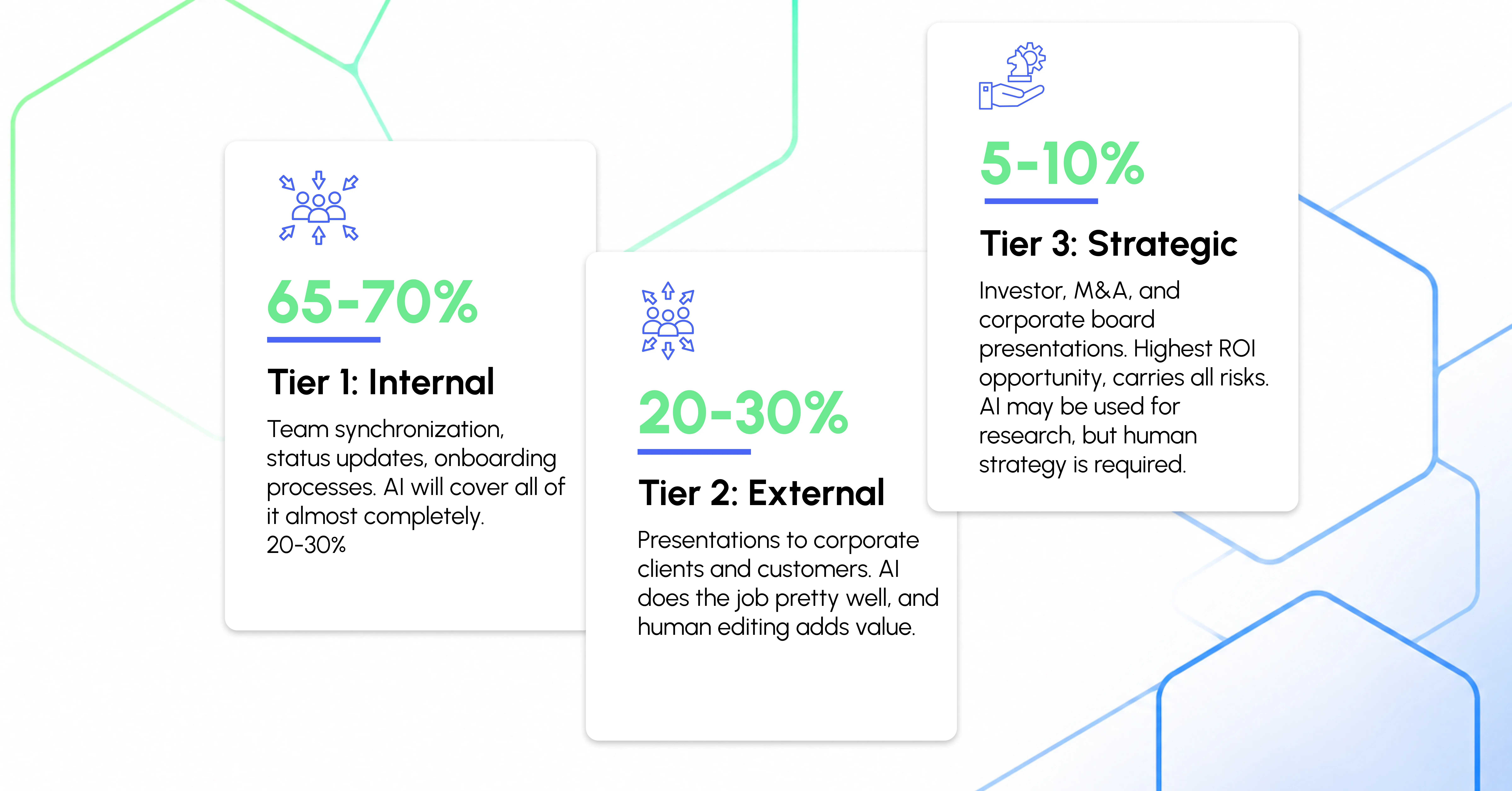
Any conversation about which tool to choose or what budget to allocate should begin with an audit. Audit your presentation strategy first. Almost all organisations share the same deck allocation:
Shifting resources from internal decks to strategic decks usually pays off the most.
INK PPT METHODOLOGY
Where does AI fit into INK PPT's process
We're not opposed to AI. But we treat it as an engine to start things. Not as one to finish them. This is exactly where AI comes into play and where the work of our strategists begins.
Stage
Process
Execution Type
01
Brief & audience intelligence
We begin from conversation, not prompt. Who is present in the room? What does he/she think? What is the decision he/she is supposed to make? Why is he/she hesitating to do so? There are questions that AI cannot answer. Yet, our strategists are able to give answers to them because they have discussed them directly with the client prior to designing a slide deck.
Professional
02
Research & data gathering
Once we understand what we need to prove, we turn to AI. Namely, we use the tools of Genspark and online research to obtain all the needed information regarding the market, competitors, and stats. At the same time, each obtained number is always checked manually. In such highly regulated industries as BFSI and pharmaceuticals, all research is done manually.
AI + human
03
Narrative architecture
Here lies the very essence of slide deck construction. AI is not involved in its creation in any way. Our strategists determine the main arguments, the structure, tension, solution, and the desired emotional state of the audience. A slide deck is nothing but a persuasive speech; thus, its structure should be determined manually.
Professional
04
First draft & content generation
Thanks to the gathered information and created narrative architecture, we use Gamma or Plus AI to generate a rough draft of the slide deck. Then, a specialist redesigns every single slide according to the client's preferences. Thus, the process begins with using AI and ends with creating human-driven content.
AI + human
05
Visual design & brand fidelity
Our designers follow a set of specific design guidelines. All the elements, including font types, weights, colours, and spacing are deliberately chosen in order to make a slide look appropriate and convincing. When it comes to complex visual concepts, Napkin AI provides our designers with some support, yet all visualisations are developed manually.
Professional
06
Review, refinement & delivery
Prior to sending a slide deck to the client, our strategists check it. They make sure that the introduction is persuasive, the story is compelling and the last slide poses the key question in a proper manner. Of course, no machine can perform these tasks; thus, human effort is crucial at this stage.
Professional
Recommended AI stacks for different industries
An optimal stack always depends not so much on the company size, but rather the presentation type you have to make.
INDUSTRY / SCALE
RECOMMENDED AI STACK
AI HANDLES
Startup (<10 people)
Gamma + Genspark. Pitch decks and investor meetings should be polished by humans.
80%+
Growth startup (10–50)
Beautiful.ai + Genspark. Series B/C fundraising and board presentations require human strategy.
60–70%
Mid-market (50–500)
Copilot + Canva AI. Leadership summits and client presentations require human design.
50–60%
Large enterprise (500+)
Copilot + Plus AI. Investor days, M&A, and communication with clients always require human involvement.
40–50%
Consulting/Prof. services
Genspark for research and custom-made templates. Human-driven client deliverables remain the norm.
30–40%
FMCG/retail/consumer
Canva AI. Brand launches require professional creative direction.
60–70%
Pharma/BFSI/legal
Limited usage of AI tools for research only. Virtually all presentations should remain human-driven.
20–30%
Three must-haves for company-wide AI implementation
Create a locked brand template
All AI tools work much better when there is a master template of a PowerPoint or Google Slides presentation. This is the key investment to be made prior to implementing any AI tool.
Train by use case, not by AI tool
"How to use Gamma" will take no more than 20 minutes. On the other hand, training your teams on when to use Gamma, Genspark, or Plus AI for certain deck types may require weeks of work.
Define your tier 3 firewall
There should be clear rules on how to determine whether the deck is to be escalated or not. These could include certain seniority of the external audiences, enterprise clients, or specific contexts like investment or regulation.
What AI still genuinely cannot do
These points are not made to justify why human-driven design is required; rather, they are actual problems that could be faced in the future. That's why it is important to consider them carefully.
1. Audience intelligence before the deck is created
The best deck is the one that is built based on the audience's preferences and decision-making style. While AI can help analyse companies, it won't be able to find out what a particular CFO thinks about his/her company.
2. A narrative structure which persuades
Gamma and Genspark can create an effective narrative structure for a slide deck. However, they cannot decide on how to engage your audience with a provocative question or how to surprise him/her with a key data point on a particular slide.
3. Brand fidelity in enterprise scale
There are always a lot of requirements related to the corporate branding in enterprise projects. No matter how good AI tools are, they will never be able to execute all of them accurately and professionally.
4. Visual ideas
The best decks are the ones with a visual idea. It means that the audience is able to see something specific that makes him/her think. This cannot be achieved by using prompts to the AI tool only.
5. Accountability
No one can be responsible for an AI-generated deck. A human is always accountable for every slide he/she designs and the result it brings.
Final Thoughts
By 2026, the best companies won't choose whether AI or human-driven design is used for their slide decks; instead, they will use both in the right way.
AI will be used in most cases to reduce the amount of time needed to build slides and improve the quality of slides made manually significantly.
Nevertheless, some slides still require human intelligence, research, creativity and accountability, especially in cases of large enterprises.
Use AI for mass production. Use human creativity to persuade.
“Doubts about your presentation stack?”
INK PPT creates presentations for Honda, Google, Microsoft, Dell, and J&J. We also use AI and know when it's enough.
As a passionate explorer, I see crafting the perfect story as embarking on a refreshing Himalayan journey. Every narrative is an adventure, a voyage of imagination, meticulously molded into captivating presentations. I'm here to guide you, ensuring your story becomes an unforgettable odyssey, with each creation as a vibrant landscape ready to captivate eager audiences.

.webp)