
Contact Us
Let’s Partner for Your Next Big Presentation
Consult with our Business Advisor


Corporate presentations are frequently seen as temporary means of communication. For example, a sales deck is used during a meeting with a client, an investor presentation is employed in a business discussion, and an internal training presentation might be given only once. However, when a presentation is shared digitally, uploaded to a portal, emailed to employees, or used to convey important information, accessibility then becomes very important.
Compliance officers ought not to see accessibility as a last-stage design check; it should be included in the presentation process right from the start.
When preparing presentations to be compatible with the ADA one has to consider how people with various disabilities will access, understand, and interact with the information; this can include such things as readable text and adequate colour contrast, alternative text, a logical slide structure, captions, transcripts, and compatibility with assistive technologies.
The Americans with Disabilities Act (ADA) mandates that businesses and organizations which are covered by it must communicate effectively with people who have disabilities; the U.S. Department of Justice states that the right communication aid or service will vary according to the nature, length, complexity and context of the communication.
Accessibility is therefore more than just a matter of design choice; for organizations it forms part of their responsible communication and risk management.
There doesn't exist a single checklist known as an "ADA-compliant PowerPoint" which can be applied in exactly the same way to all corporate situations.
The requirements in question depend on a number of factors, including the type of organization, the audience, the way in which the presentation is going to be used, and whether or not it forms part of a wider service or form of communication that is covered by the ADA. Where a business is open to the public, Title III of the ADA mandates equal access and effective communication, along with the provision of appropriate auxiliary aids and services if needed.
For compliance officers, the practical question is therefore not simply:
"Is this PowerPoint ADA compliant?"
A better question is:
"Can the intended audience actually access the presentation and understand it, including those who use assistive technologies or need communication in alternative forms?"
This change enables companies to incorporate accessibility into their communications standards rather than merely ticking the box at the end of a project.
Accessibility standards such as the Web Content Accessibility Guidelines (WCAG) can likewise offer useful technical advice regarding digital content. Nevertheless, WCAG and the ADA are not equivalent terms. It is up to organizations to decide which legal, regulatory, contractual, and internal accessibility requirements apply in their particular case.
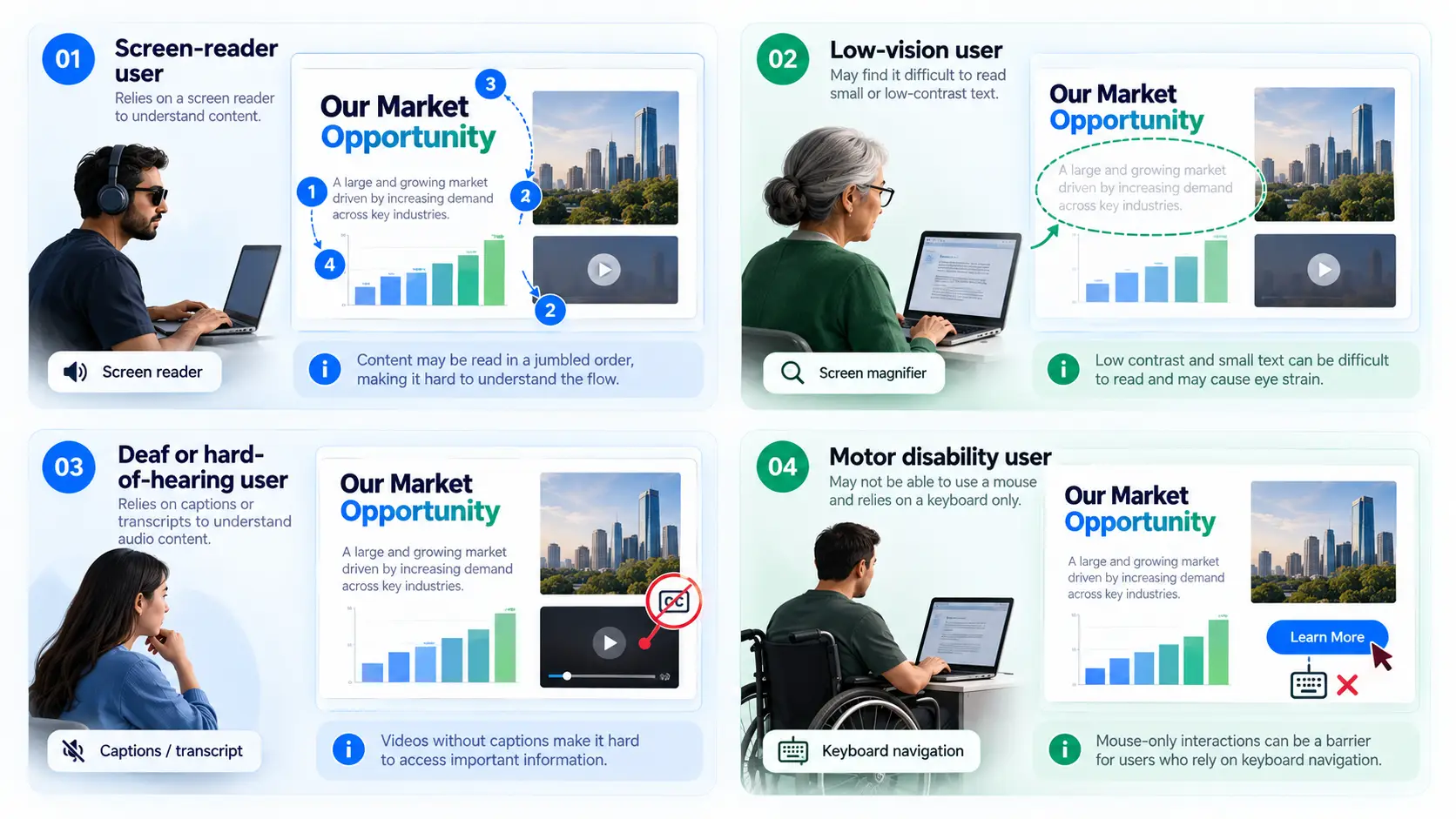
A presentation can appear well put together and yet still cause accessibility problems.
Imagine a standard corporate slide. It could have a headline, a number of text boxes, an infographic, a chart, a photograph, and a video. To an ordinary person looking at it, all of this might seem obvious.
However, a person who uses a screen reader might find the content presented in an illogical sequence. Those with low vision could have trouble with text that has low contrast. A deaf or hard of hearing person might fail to pick up information which is contained only in an audio track. A person with a motor disability might experience difficulty in using the presentation controls which require a mouse.
This is why ADA compliant presentation design needs to consider both visual design and the underlying structure of the presentation.
The goal is not to make presentations less attractive. It is to make the same information available to more people.
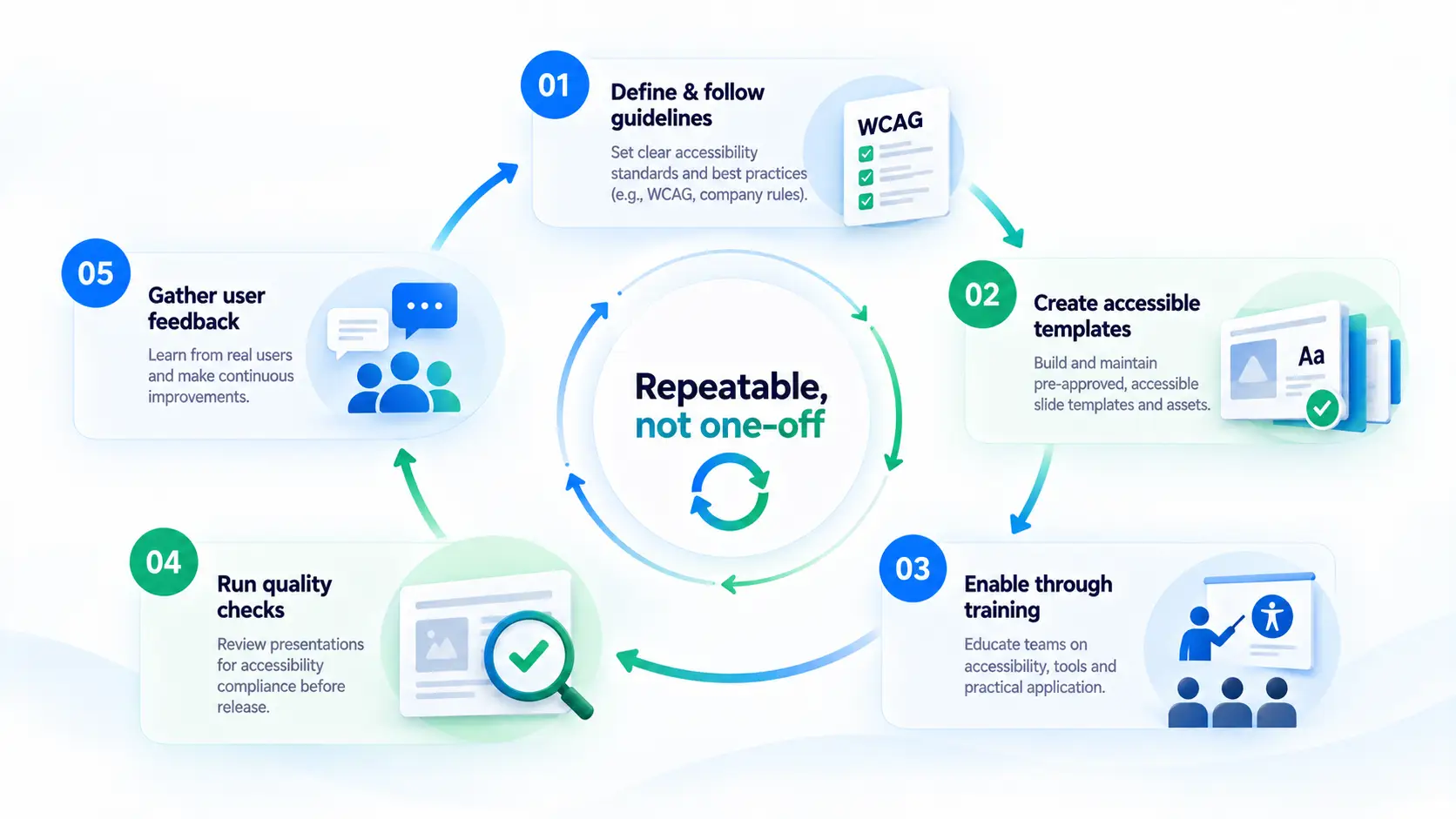
Accessibility managers can play a central role in turning accessibility from an individual responsibility into an organizational process.
Without a defined owner, presentation accessibility can become inconsistent. One designer may add alt text while another does not. One department may use accessible templates while another continues using old presentation files. Training teams may know about captions but overlook reading order.
An accessibility manager can help establish a repeatable framework.
The broader objective is to make accessibility part of the normal presentation workflow.
Diversity and inclusion teams can also influence how accessibility is handled across an organization.
Accessibility is closely connected to inclusive communication. A presentation that excludes part of its audience because of poor design is not serving the same communication purpose for everyone.
D&I teams can work with compliance, HR, communications, IT, learning and development, and brand teams to create common standards.
For example, an organization can establish a presentation accessibility policy covering:
This approach also prevents accessibility from becoming isolated within a single department.
A sales team, for instance, may use a presentation created by marketing. Marketing may have followed one set of accessibility practices while the sales team modifies the deck without understanding how those changes affect accessibility.
An organization-wide standard reduces this inconsistency.
A good accessibility process begins with the basic elements of every slide.
Every slide should have a clear title that communicates its purpose.
Titles also help users navigate presentation content, particularly when assistive technology is involved. Avoid relying only on visual positioning to explain how content is organized.
The visual order of objects is not always the same as their logical reading order.
For example, a slide may visually place a statistic above a supporting explanation. If the underlying object order causes a screen reader to announce the explanation first, the meaning can become difficult to follow.
Review the reading order and make sure it follows a logical sequence.
Images that communicate information should have meaningful alt text.
For example, simply labeling a chart as “sales chart” does not tell a screen-reader user what the chart communicates.
Decorative images, on the other hand, should not create unnecessary noise for assistive technology users. The important point is to distinguish between decorative visuals and visuals that carry meaning.
Text should remain readable against its background. Do not assume that a color combination is accessible because it looks good on the designer's monitor. Contrast can be affected by screen quality, lighting, display settings, and visual impairments.
Color should also not be the only method used to communicate meaning.
For example, instead of saying “the red line represents declining revenue and the green line represents growth,” use labels or other visual cues that communicate the difference without relying solely on color.
Charts can create accessibility challenges because they often communicate information visually without providing an equivalent text-based explanation. A strong accessible presentation should make the key takeaway available in text.
Instead of relying entirely on a complex graph, provide a short statement explaining what the audience should understand from it.
If a presentation includes video or other audio-based information, captions can help people who are deaf or hard of hearing.
Depending on the context, transcripts or other communication support may also be appropriate. The Department of Justice specifically recognizes captioning, written materials, and other communication aids as examples of auxiliary aids and services.
Avoid using vague link text such as “click here.”
A descriptive link tells the user where the link leads or what it does. This becomes especially useful when someone navigates through links using assistive technology.
Accessibility checking tools can help identify common problems, but passing an automated check does not necessarily mean the presentation provides an effective experience for every user.
Where possible, combine automated checks with manual review and user testing.
It is not the case that all organizations produce each of their presentations themselves.
Important corporate decks can be produced by external agencies, freelancers, production partners, and presentation design companies. It therefore also involves the procurement teams in terms of ADA corporate compliance.
It is necessary to set out the accessibility requirements before choosing a vendor, not after the presentation has been given.
When evaluating a presentation design vendor, procurement and compliance teams can ask:
Accessibility requirements can also be included in RFPs and statements of work. It turns accessibility into an explicit deliverable rather than taking it for granted.
For any organization which produces a large number of presentations, keeping up its accessibility expertise on its own will require continuous training, quality assurance, testing, and process management.
By outsourcing you can gain access to specialized presentation designers who know not only about visual communication but also about accessibility requirements.
It does not follow that outsourcing passes on the responsibility for compliance to the vendor. The organization still has the need for proper governance.
A useful outsourced workflow might look like this:
Brief - Accessibility requirements - Design - Accessibility review - Testing - Internal approval - Final delivery
Contracts and statements of work must clearly state the accessibility expectations, the duties involved in the review, the deliverables, and the procedures for remediation.
It is especially important when presentations are being made to customers, to employees, to those taking part in training programs, at public events, in communications with investors, or in any other situation of high visibility.
Accessibility is usually talked about mainly in terms of compliance, but it can also lead to operational and financial advantages.
An organization which takes accessibility into account when it is designing can decrease the need for having to make corrections later on.
For instance, it is more efficient to fix an accessible template than to have to correct dozens of presentations which have been created from an inaccessible template.
Similarly, establishing standard accessibility practices can reduce:
There can also be wider business advantages since accessible communication enables organizations to contact groups who would have otherwise faced obstacles.
Compliance officers must not view accessibility as merely a return-on-investment calculation, for the main aim should be to ensure effective and equitable communication. Although financial efficiency is an important operational advantage, it should support rather than take the place of that objective.
A sustainable accessibility program needs more than individual designers who know how to add alt text.
Organizations should consider developing a formal presentation accessibility policy.
This creates accountability while making accessibility easier to manage at scale.
Compliance officers need to have the ability to see whether the accessibility processes are in fact working.
The reason for carrying out measurements is not merely to produce yet another compliance dashboard. The aim is to identify problems that recur.
If an accessibility problem occurs in hundreds of presentations, the issue may not lie with mistakes made by individual employees. Instead, the organisation might need a better template, more clear guidance, improved training, or a change to its design workflow.
Organisations that have good intentions may still fail to notice fundamental accessibility issues.
It doesn't have to involve more complicated technology. In numerous instances, it is a more effective process.
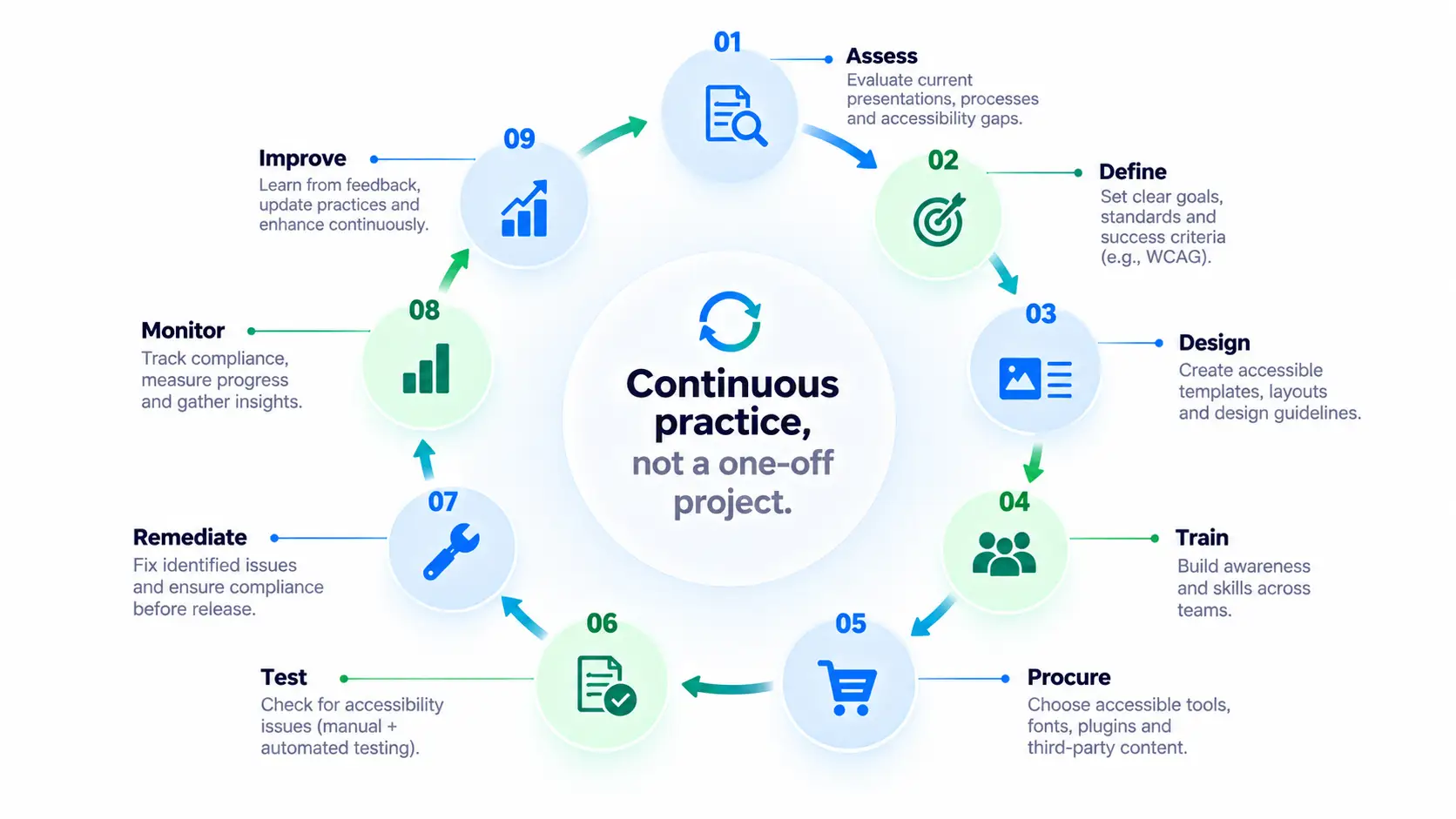
For organizations building or improving their presentation accessibility program, the following framework can provide a useful starting point:
This method changes accessibility from something that is a one-off project into a continuous corporate practice.
Corporate presentations achieving ADA compliance is really a matter of communication.
A presentation can only be considered successful if the audience for whom it is intended is able to access and understand the message; for people with disabilities, this can be difficult due to poorly organised slides, inaccessible visuals, the absence of captions, insufficient contrast, or barriers for screen readers.
That is the reason why ADA compliant presentations should be regarded as part of an overall accessibility strategy.
Compliance officers could play a leading role in this by gathering together the accessibility managers, the diversity and inclusion teams, the designers, IT, the procurement department, the legal teams and any external presentation partners. Accessibility can then become a standard part of the presentation process if the appropriate standards, templates, training, testing and accountability measures are put in place.
The best method is not to consider whether it's possible to add accessibility to a presentation at the end.
We should incorporate ADA compliant presentation design into the process right from the beginning.
If accessibility is incorporated into ADA corporate compliance, then organizations are able to produce presentations that are easier to navigate, more inclusive, and better equipped to communicate with a diverse audience.
As a passionate explorer, I see crafting the perfect story as embarking on a refreshing Himalayan journey. Every narrative is an adventure, a voyage of imagination, meticulously molded into captivating presentations. I'm here to guide you, ensuring your story becomes an unforgettable odyssey, with each creation as a vibrant landscape ready to captivate eager audiences.

About the Author



Consult with our Business Advisor


